


2026–2027 reMarkable Paper Pro Move Digital Planner – Hyperlinked Daily, Weekly and Monthly Productivity Planner
2026–2027 reMarkable Paper Pro Move Digital Planner – Hyperlinked Daily, Weekly and Monthly Productivity Planner
Couldn't load pickup availability
15-Month Portrait PDF Planner with Three Daily Layouts, Weekly Priorities, Monthly Goals and Linked Notes
Plan your days without fighting a layout designed for a larger tablet.
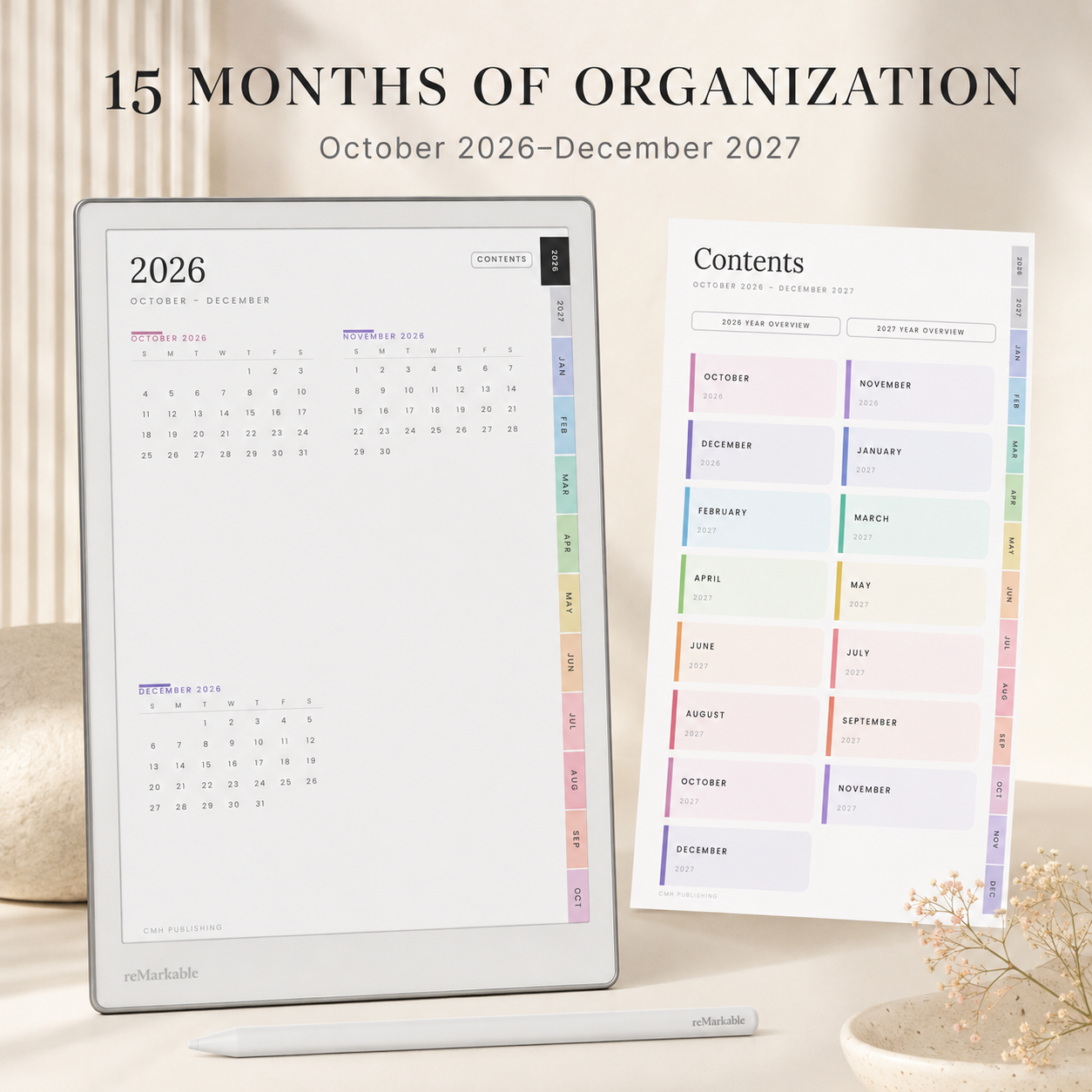
This 2026–2027 digital planner is formatted specifically for the reMarkable Paper Pro Move, giving you a clean, portrait-oriented planning experience that fits its compact screen. The fully hyperlinked PDF makes it easy to move between yearly, monthly, weekly and daily pages without endless scrolling.
Covering October 2026 through December 2027, this substantial 15-month planner includes 1,538 pages for managing appointments, priorities, projects, reminders and handwritten notes.
What’s Included
- 15 dated months: October 2026–December 2027
- 2026 and 2027 year-at-a-glance calendars
- Monthly calendar dashboards
- Monthly goals, focus and reminders
- Dedicated monthly notes pages
- Weekly planning pages
- Weekly main goal and top-priority sections
- Weekly review, wins and carry-forward pages
- Three planning pages for every date
- Daily hourly schedule from 6:00 AM–10:00 PM
- Daily top-three priorities
- Task and priority management pages
- Full-page daily notes
- Mini weekly calendars on daily pages
- More than 34,000 internal navigation links
- 1,538 total planner pages
Three Daily Layouts
Every date includes three coordinated pages:
- Daily Schedule: An hourly timeline, top priorities and notes
- Task Planner: Space for tasks, priorities and scheduling
- Daily Notes: A clean page for meetings, ideas, journaling or project notes
Use only the layouts you need or combine all three for detailed daily planning.
Designed for Fast Navigation
Hyperlinked year, month, week, day and notes sections help you jump directly where you need to go. Persistent side tabs provide quick access to every month, while return links make moving between connected pages simple.
Perfect For
- Professionals working on the go
- Business owners and entrepreneurs
- Project and operations managers
- Students and educators
- Meeting and appointment planning
- Goal setting and productivity tracking
- Anyone replacing multiple paper notebooks with one organized system
Important Information
- Digital PDF product only
- No physical planner or tablet is included
- Dated October 2026 through December 2027
- Created for use on the reMarkable Paper Pro Move
- A basic understanding of importing and using PDF files on reMarkable is recommended
- For personal use only unless otherwise stated in the seller’s license
Share


- 5 stars: 17 (100%)
- 4 stars: 0 (0%)
- 3 stars: 0 (0%)
- 2 stars: 0 (0%)
- 1 star: 0 (0%)
I was skeptical about navigating a 1,538-page PDF, but the tab hierarchy makes finding any date effortless. The clean neutral design looks fantastic on the e-ink screen without causing eye strain during evening planning sessions. It is a dependable daily driver for busy professionals.
The weekly wins and reflection space has completely transformed how I wrap up my workweek on Friday afternoons. Switching between schedule, tasks, and notes for a single date keeps everything consolidated without creating clutter. It is worth every cent for anyone managing a demanding schedule.
Finally, a digital planner that doesn't treat the compact screen as an afterthought. The typography is sharp, the margins leave plenty of writing room, and writing on the daily notes page feels natural. It keeps my entire schedule organized well ahead of October.
Having 15 full months gives me plenty of runway for planning through the end of 2027. The daily priority check-ins keep me focused on essential work before diving into routine emails. It downloaded quickly and synced across the reMarkable cloud with zero issues.
The hourly timeline gives me clear visibility over appointments without cluttering the rest of my tasks. Hyperlinks fire immediately with no noticeable delay on the Paper Pro Move. It is clean, functional, and replaces three separate notebooks I used to carry around.
Mapping out the rest of 2026 and all of 2027 in one unified document is a game changer for long-term project tracking. The return links make moving back to weekly and monthly dashboards frictionless. It feels like a thoughtfully engineered productivity tool rather than just a basic PDF.
The portrait layout feels natural in hand and takes full advantage of the Paper Pro Move's dimensions. I use the task planner for business milestones and the third daily layout for quick meeting notes. It is tidy, logical, and easy to adapt to any daily routine.
Seeing over 34,000 links had me worried about potential lag, but the document opens quickly and page turns are snappy. Being able to jump directly from a monthly overview into an hourly daily schedule is a huge time-saver. It is tailored wonderfully for managing projects on the go.
Setting monthly goals alongside dedicated monthly notes has kept my freelance deliverables right on schedule. The side tabs are placed intuitively so you don't trigger them accidentally while writing with your stylus. It is easily the best productivity PDF I have installed this year.
The top-three daily priority slots prevent me from overloading my workday with unrealistic expectations. Stylus input feels natural across the lined note templates, and palm rejection works smoothly around the edges. It strikes the right balance between clean minimalism and deep organization.
Having the full 15-month span through December 2027 means I won't have to migrate to another planner halfway through next year. The weekly review and carry-forward sections keep me accountable on Sunday afternoons. The link accuracy across the entire file is remarkably reliable.
I love that every single date has three coordinated pages instead of trying to squeeze everything into one cramped box. The muted pastel tabs look crisp and elegant on the Move display. The file imported into my reMarkable library effortlessly in under a minute.
The separate layout for daily tasks keeps my action items cleanly distinguished from my hourly meetings. Writing feels fluid, and jumping back to the month-at-a-glance calendar takes just a single tap. It has made transitioning completely to a digital workflow completely seamless.
The mini weekly calendar on every daily page is a brilliant touch for keeping track of the week at a glance. Tapping between the task planner and daily schedule is instantaneous with the stylus. It has completely eliminated the need for physical notebooks on my desk.
Most digital planners feel crowded on a smaller tablet, but the portrait scaling here is spot on. The dedicated daily notes page gives me all the freeform writing room I need without sacrificing my daily schedule. Navigating through over 1,538 pages with zero lag is seriously impressive.
I downloaded this early to prepare for Q4, and the October 2026 start date aligns with our planning cycle. The 6:00 AM to 10:00 PM hourly schedule provides just the right amount of structure for client calls. It is easily one of the smoothest hyperlinked PDFs I have tested on this device.
Finding a template tailored specifically to the compact 7.3-inch screen of the Paper Pro Move makes all the difference. The side tabs are responsive and make flipping between months completely seamless. Having three distinct daily layouts lets me separate my work meetings from personal errands without any visual clutter.